1534 commitsLast commit ≈ 3 weeks ago131 stars21 forks
VoltRon
VoltRon is a spatial omic analysis toolbox for multi-omics integration using spatial image registration. VoltRon is also capable of analyzing multiple types of spatially-aware data modalities.
2
contributors
Description



VoltRon
Spatial omic analysis toolbox for multi-resolution and multi-omic integration using image registration
Website | Tutorials | Preprint
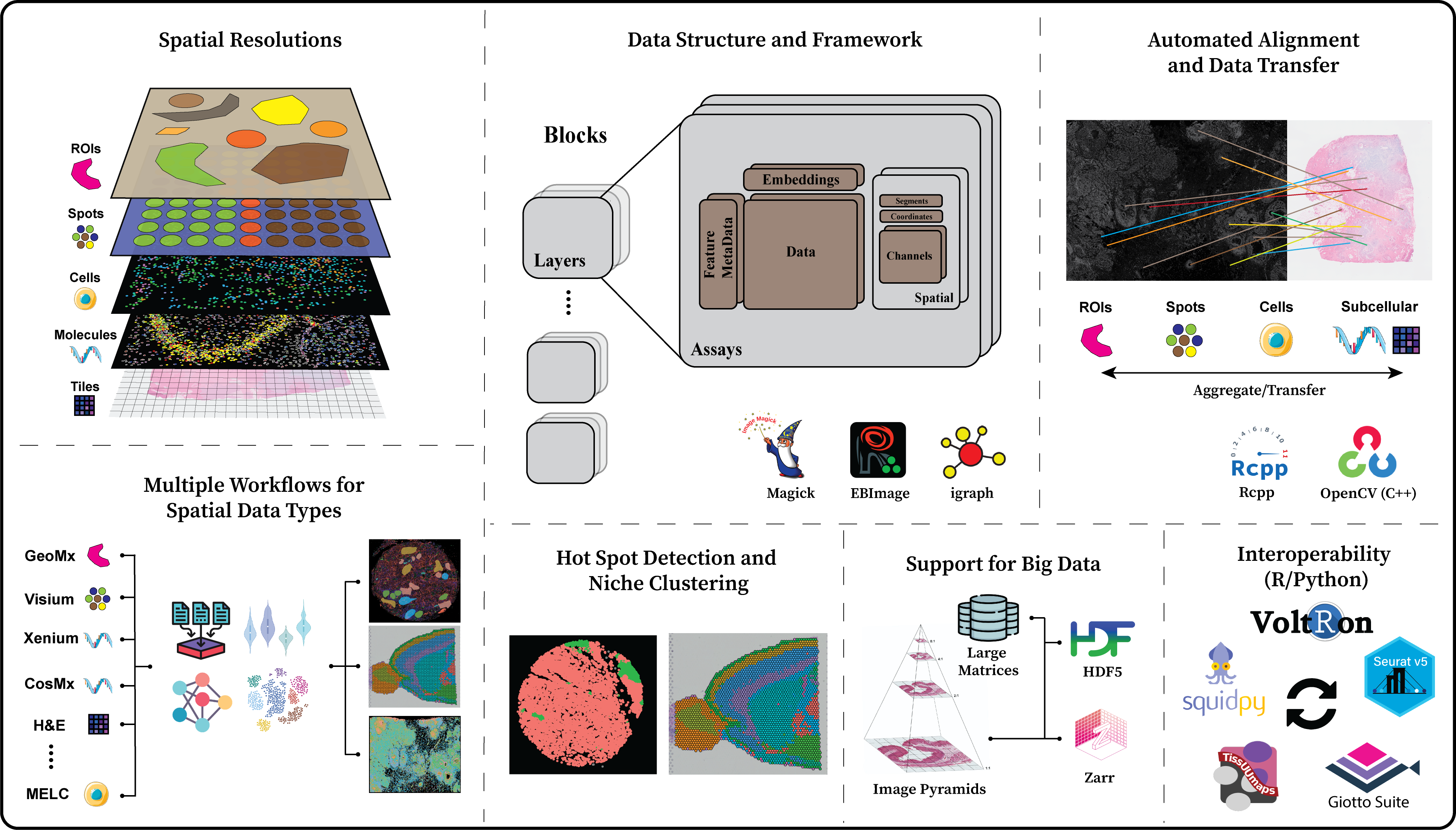
VoltRon is a spatial omic analysis toolbox for multi-omics integration using spatial image registration. VoltRon is also capable of analyzing multiple types of spatially-aware data modalities.
Installation
You can install for Linux, Windows and MacOS setups via r-universe which you may require R version >= 4.5.0:
install.packages('VoltRon', repos = c('https://bimsbbioinfo.r-universe.dev',
                                      'https://bioc.r-universe.dev',
                                      'https://cloud.r-project.org'))
The development version can also be installed from GitHub repository using devtools:
if (!require("devtools", quietly = TRUE))
    install.packages("devtools")
devtools::install_github("BIMSBbioinfo/VoltRon")
Depending on the number of required dependencies, installation may be completed under a minute or may take a few minutes.
On Windows and MacOS, OpenCV will be downloaded automatically upon installation. However, Rtools may be required to be downloaded too, hence this may take some time!
On Ubuntu you may need libopencv-dev:
sudo apt-get install libopencv-dev
Dependencies
VoltRonStore
VoltRon incorporates VoltRonStore package to install dependencies necessary to run VoltRon objects on disk for large images and data matrices.
The script below will install dependencies such BPCells, ImageArray, HDF5DataFrame etc.
if (!require("devtools", quietly = TRUE))
    install.packages("devtools")
devtools::install_github("BIMSBbioinfo/VoltRonStore")
or from R-universe:
install.packages('VoltRonStore', repos = c('https://bimsbbioinfo.r-universe.dev',
                                           'https://bioc.r-universe.dev',
                                           'https://bnprks.r-universe.dev',
                                           'https://cloud.r-project.org'))
See https://bimsbbioinfo.r-universe.dev/builds for more information.
SimpleITK
VoltRon incorporates the SimpleITK package to execute non-rigid alignment across assays. You can download MacOS-arm (.tgz) or Windows (.zip) binaries from
https://github.com/BIMSBbioinfo/SimpleITKRInstaller/releases, and install as below:
install.packages("path/to/SimpleITK_2.5.3.tgz", repos = NULL, type = "binary")
You can also install SimpleITK from GitHub using the following command. Depending on the number of processors the user has,
you can modify the MAKEJ=6 argument. We also need SimpleElastix module of SimpleITK to be installed,
hence we add -DSimpleITK_USE_ELASTIX=ON to the ADDITIONAL_SITK_MODULES argument.
if (!require("devtools", quietly = TRUE))
    install.packages("devtools")
devtools::install_github(
  repo = "SimpleITK/SimpleITKRInstaller",
  configure.vars=c("MAKEJ=6",
                   "ADDITIONAL_SITK_MODULES=-DSimpleITK_USE_ELASTIX=ON"))
For more information, plase visit the SimpleITK website.
RBioformats
VoltRon incorporates RBioformats package to import images from ome.tiff files, which requires Java JDK to be available in your system:
See https://cran.r-project.org/web/packages/rJava below for more information.
RCDT
RCDT package has been archived as of 15.01.2026. Please install as below:
devtools::install_github('stla/RCDT')
or
install.packages('RCDT', repos = c('https://bimsbbioinfo.r-universe.dev',
                                   'https://cloud.r-project.org'))
Staying up-to-date
To ask questions please use VoltRon discussion forum on google groups.
Docker Hub
You can also run VoltRon from a container already available in Docker Hub. The docker image is based on the Rocker Project and can be run from the terminal like below:
docker run --rm -ti -e PASSWORD=<yourpassword> -p 8787:8787 amanukyan1385/rstudio-voltron:main
Then, start the RStudio session from the browser at http://localhost:8787/ and enter rstudio as username and <yourpassword> as password.
See here for more instructions on how to run the container using Docker Desktop.
References
Manukyan, A., Bahry, E., Wyler, E., Becher, E., Pascual-Reguant, A., Plumbom, I., ... & Akalin, A. (2023). VoltRon: A Spatial Omics Analysis Platform for Multi-Resolution and Multi-omics Integration using Image Registration. bioRxiv, 2023-12.
Keywords
License
Not specifiedContributors
Contact person
Am
Am
Artür manukyan
Core Developer / Maintainer
MDC
AA
ALTUNA AKALIN
Helmholtz Program-oriented Funding IV
Research Field
Research Program
PoF Topic